
MU 205 Reading Your Numbers
MAGNOLIA UNIVERSITY
GROWING · MU 205
Reading Your Numbers
Creators · About 5 minutes
Watch the lesson
PRINTABLE FOR THIS LESSON
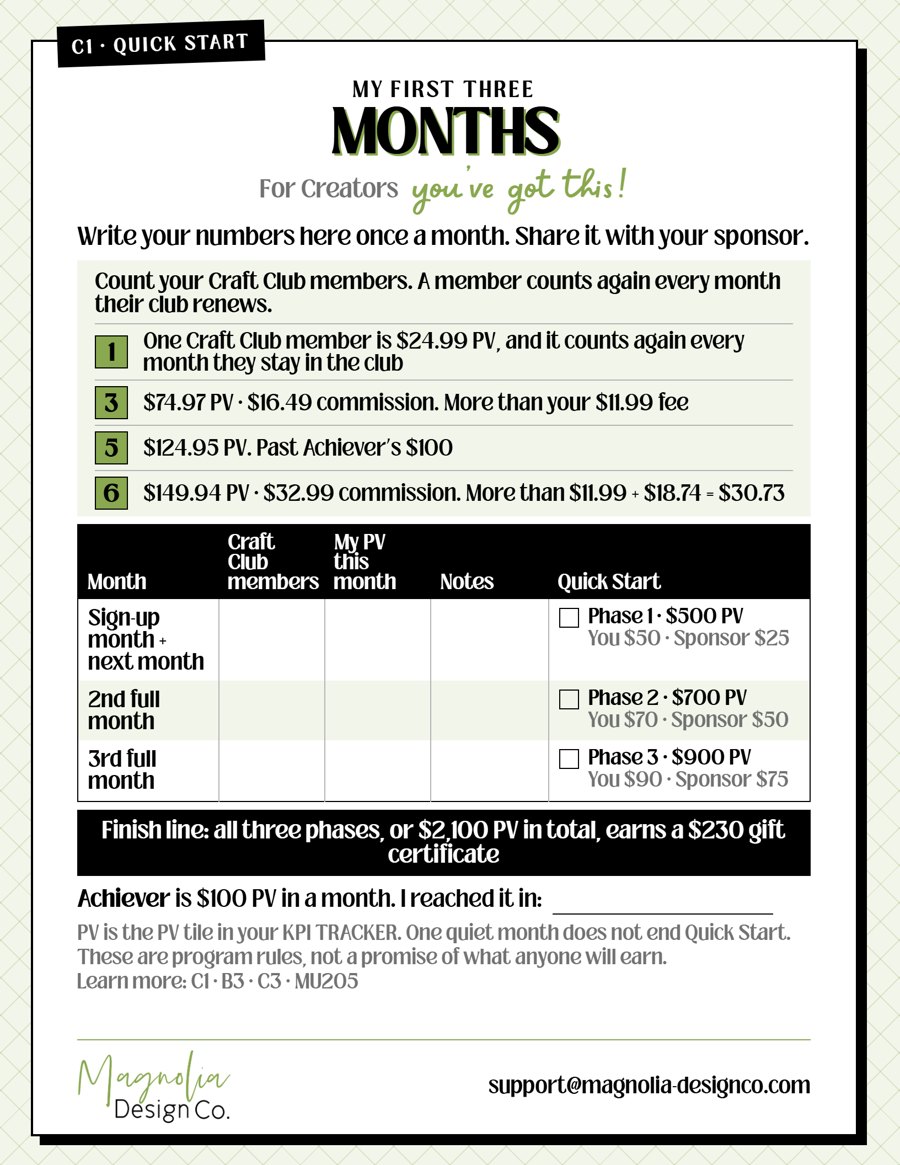 |
My First Three Months Tracker · letter, 1 page |
In this lesson you’ll learn
- Where your PV and your rank progress show on your Backoffice dashboard
- How to see what you’ve earned so far this month
- Where your gift certificates and Quick Start progress live
Why this matters
Your numbers tell you how your month is going while there’s still time to do something about it. Checking once a week, in the middle of the month, takes five minutes. And it means nothing surprises you on the 15th.
The words to know
- PV means your own orders plus your customers’ orders, added together, in one month. Some screens print the same number as CV or PCV. It is the same number.
- Rank means a level you reach by your monthly numbers. Your first rank is Achiever, at $100 PV in a month.
- Projection means a live estimate of what you’ve earned so far this month.
The steps
- Log in at backoffice.magnoliadesignco.com with your Magnolia ID Number or email, and your password.
- Find your RANK PROGRESS ring on the Overview page. It shows how close you are to Achiever, as a percent. The tabs show Current, Last and Highest.
- Tap VIEW RANK REQUIREMENTS to see exactly what Achiever needs: $100 PV in a month.
- Find your PV in the KPI TRACKER. The PV tile is your PV for the month you pick. Every tile can be tapped to see the detail behind it.
- Look at the VOLUME TRACKER to see your last three months side by side.
- See your earnings so far. Click Commissions → Summary. This month’s line says View Projection. Past months say View Statement.
- Find your gift certificates. Click Commissions → Your Gift Certificates.
- Check Quick Start progress under Report in the left menu.
Three ways to reach Achiever
- Five Craft Club members ($124.95 PV)
- Customer orders that add up to $100
- Your own orders (they count in full)
Good to know
- Your $11.99 monthly fee must be current that month to earn. If it lapses, nothing is earned that month.
- Commission is paid on the 15th of the following month, once you have $25 or more to pay. Your bank details go in: click your name, top right → Edit Bonus Account.
- Questions about a number? Open a ticket on Magnolia Connect.
Your one thing to do
Set a weekly reminder: “Check my RANK PROGRESS ring and my PV tile.”
Watch next: MU201 A Repeatable Month
On Magnolia Connect: How to Access the Back Office & Fix Login Issues · Creator Rewards Program
Check what you learned
Tap the answer you think is right. There’s no grade, so have fun with it!
1. Where do you see how close you are to Achiever?
- The RANK PROGRESS ring on your Overview page
- Edit My Picture
- Settings
Show the answer
2. Where do you check your Quick Start progress?
- Social Networks
- Report, in the left menu
- New Order
Show the answer
3. How often should you check your numbers?
- Only on the 15th
- Once a year
- Once a week
Show the answer
All done with this one?
Your progress shows on the Magnolia University page.